Your agent can finally see the app it is editing.
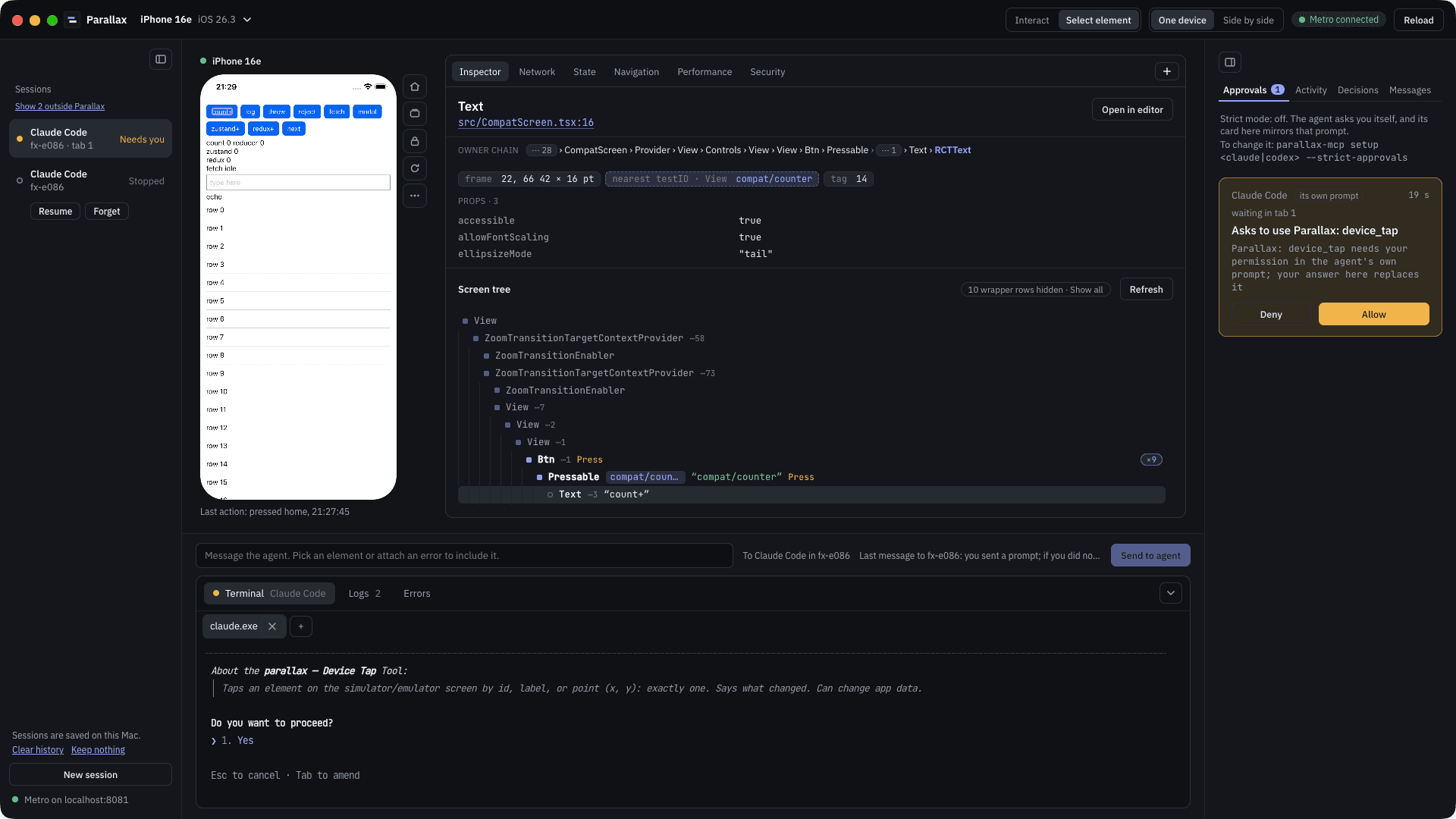
Parallax for React Native gives your coding agent and you the same live view of your running app: the simulator screen and input, the component tree with file and line, logs, errors, network and state. The agent checks its own change before it says done. You watch, point and approve.
npx -y @parallax-rn/mcp@0.1.0-beta.2 setup claude- parallax-mcp 0.1.0-beta.2: setup for Claude Code, user scope
- * Register the MCP server (claude, user scope, ~/.claude.json)
- * Install the skill
- you › Check that the Save button on Profile works
- tools › status · device_ui · device_tap "Save" · app_errors
- agent › TypeError in ProfileForm.tsx:42, onSave is undefined. Fixed, reloaded, tapped again: saved.
Setup shows the diff and asks before it writes. The agent turn is an example.
- agents
- Claude Code · Codex
- react native
- 0.85+ · Expo SDK 56–57
- device
- iOS sim · Android emu
- status
- closed beta
What your agent gets
19 MCP tools, each marked as one that reads or one that acts on the simulator or the app. Allow the readers once; keep your agent’s prompt, or the window’s approval queue, for the rest.
Full tool referenceSession
What is running and what is missing, with a fix line per failed check.
statusMetro, project root (other paths are relative to it), RN version, app connection, SDK versions, warnings.readsdoctorChecklist (device tools, Metro, app, SDK, build plugin, versions) a Fix per problem.reads
Device
The iOS simulator or the Android emulator: the screen as elements or pixels, and real touches and typing.
device_listLists iOS simulators/Android emulators (id, name, state), booted first.readsdevice_bootBoots an iOS simulator or Android emulator by id or name.actsdevice_screenshotScreenshot of the simulator/emulator screen (downscaled; full: true for native size).readsdevice_uiSimulator or emulator screen as an accessibility tree: elements with id (testID) or label, role, value, position.readsdevice_tapTaps an element on the simulator/emulator screen by id, label, or point (x, y): exactly one.actsdevice_typeTypes ASCII text input (max 500) into the focused field of the simulator/emulator; tap it first.actsdevice_swipeSwipes or scrolls the screen (simulator/emulator); direction is where the finger moves (up shows content below).actsdevice_open_urlOpens a URL or deep link on the simulator/emulator (a web URL opens Safari; a deep link can run app actions).acts
App
Inside the JS runtime: the component tree with file:line, logs, errors, network, state, navigation.
app_launchLaunches an installed app on the simulator/emulator by bundle id/package; restart: true terminates it first.actsapp_reloadReloads the running React Native app through Metro and waits for it.actsapp_logsConsole logs of the running React Native app across reloads.readsapp_errorsMetro build error (syntax error, missing module), then JS exceptions (crashes, red box, render errors), grouped, with files and a code frame.readsapp_treeReact component tree of the running app: project components and screen elements, file:line with the build plugin.readsapp_dataThe running app's network, state, nav, perf (frame rates, drops), anim (running animations) or security hints, secrets removed.readsapp_commandsLists dev commands the running app registered through the SDK.readsapp_command_runRuns a dev command the app registered through the SDK, optional JSON args.acts
From you
What you send the agent from the desktop window.
parallax_inboxRead what the user sent you from the Parallax app.acts
What you see
The desktop app shows the same app the agent works on: the live simulator you can click and type into, the Inspector that turns a click into the component and its source line, the logs and errors feed, network, state and navigation panels, your agent in a terminal tab, and one queue for its approval requests.
Measured, not promised
- 78 ms
- from a click on the screen to the component and its line in the Inspector
- median of 10 picks, iPhone simulator, October 2026
- 42 ms
- to read the component tree of the whole screen
- one live check, October 2026
- < 10 KB
- for the whole tool list in the agent’s context
- checked by a test on every build
Where it works today
- Host
- macOS on Apple silicon. The desktop app needs macOS 26. Verified on Xcode 27.0.
- Screen and input
- iOS simulator and Android emulator. Physical devices are not supported.
- React Native
- 0.85 or newer, new architecture and Hermes. Expo development builds on SDK 56 and 57.
- Agents
- Claude Code and Codex.
- Release builds
- Untouched. The SDK and the Babel plugin work in development only.
What leaves your machine
Nothing goes to Parallax. Tool results, such as logs and the text on the screen, go to your agent’s model provider, like everything else your agent reads. Secure fields and known secrets are removed from network and state data; logs and errors reach the agent as your app wrote them.
Privacy in detailLet the agent look before it says done.
npx -y @parallax-rn/mcp@0.1.0-beta.2 setup claude